GEOLOCATION TIME & ATTENDANCE

Mobile attendance inside predefined GPS work zones.

Attendico Geolocation allows employees to register working time from the mobile app while the system verifies whether the attendance request comes from an approved work location.

It is designed for construction sites, field teams, customer premises, temporary workplaces and other operations where installing a physical attendance terminal at every location would be impractical.

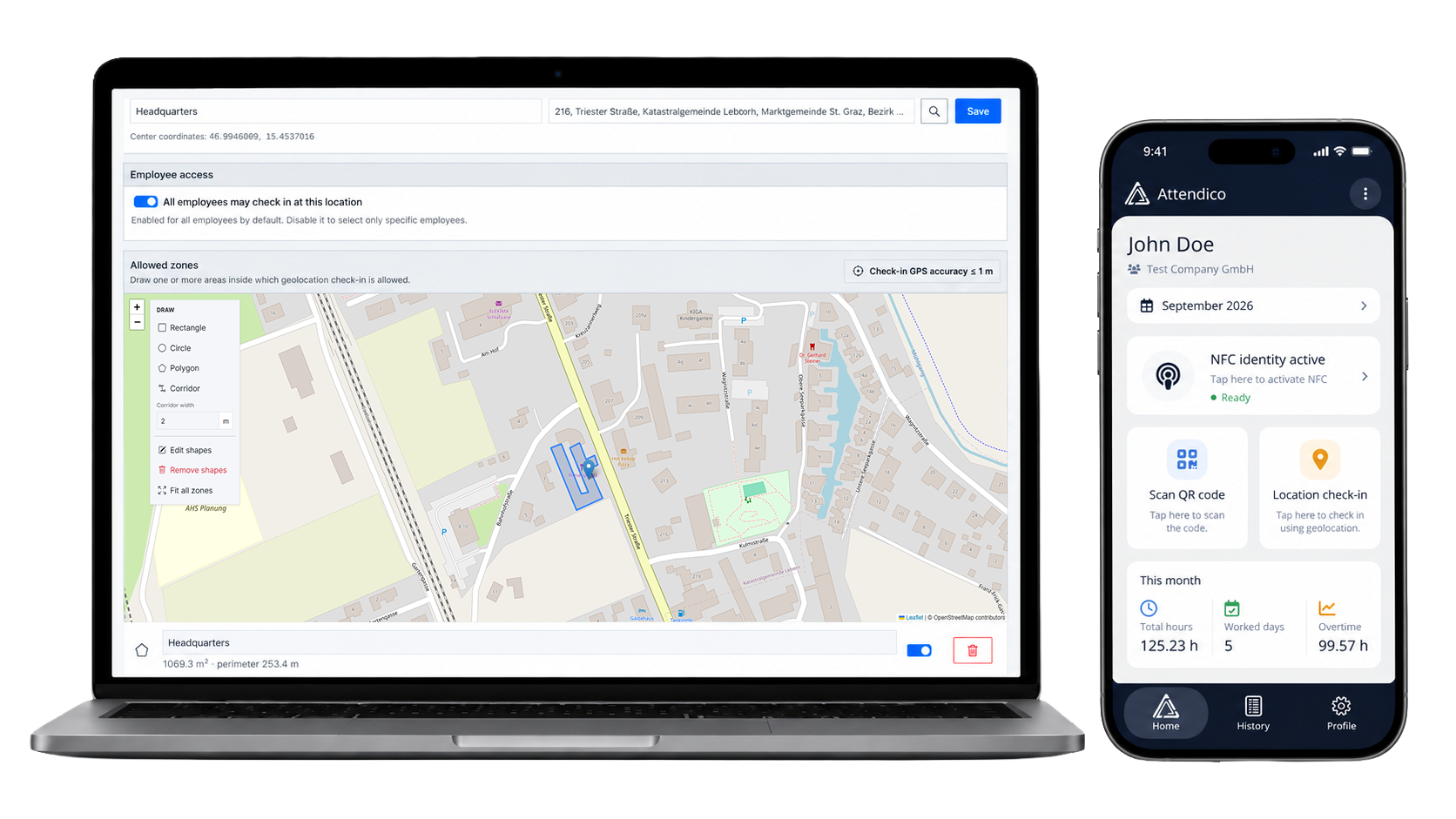
Attendico GPS geolocation employee time attendance with predefined work zones

What is geolocation-based employee time tracking?

Geolocation time and attendance uses the employee’s current mobile location as part of the attendance validation process. The company first defines an approved geographic work area — for example, a construction site, branch, warehouse yard or customer facility.

When the employee starts an attendance action in the Attendico mobile app, the phone provides the required location information to the server. Attendico checks that position against the configured work zone and determines whether the attendance request satisfies the location rule.

This means the system is not relying only on the employee pressing a button. The location context of the attendance action is also evaluated before the event is accepted.

Location-restricted attendance

The core idea is simple: employees can register attendance from the mobile app only when the request meets the configured workplace location rules.

How does GPS zone attendance work in practice?

The administrator defines the rules once. The employee then uses a short mobile workflow whenever working time needs to be registered.

01 / Define

The company creates the approved GPS zone for the workplace or project location.

02 / Open

The employee opens Attendico and starts the relevant attendance action from the phone.

03 / Locate

The mobile device obtains the current location required for the attendance request.

04 / Validate

The server compares the submitted position with the configured work zone and validation rules.

05 / Record

If the request meets the location requirement, the attendance event is recorded for the employee.

Why businesses use geolocation attendance

For businesses with employees working across different locations, Attendico Geolocation offers a simple and flexible way to track working hours without installing physical attendance terminals.

Whether your teams work on construction sites, installation projects, customer premises or temporary workplaces, you can simply define an approved work zone directly on the map. Employees can then use the Attendico mobile app to clock in, clock out or register breaks when they are physically within that zone.

Perfect for field teams. Give construction workers, technicians, installers and other mobile employees a convenient way to track their working hours directly from their smartphones.

Define your own work zones. Simply draw the permitted area on a map and decide where employees are allowed to record their attendance. Add new zones or adjust existing ones as your projects and work locations change.

Prevent attendance from unauthorized locations. Employees can only register their attendance when their smartphone is within an approved GPS zone, helping reduce the risk of clock-ins from outside the workplace.

No additional hardware

The employee already carries the attendance device: the phone. That can make deployment much simpler for field operations where electricity, network cabling, wall mounting or permanent hardware would be inconvenient.

Location verification. Not constant tracking.

Attendico Geolocation is designed to verify where employees clock in, clock out or register their breaks — not to track their every movement throughout the day.

When an employee records an attendance action, the system checks whether their smartphone is within an approved GPS work zone. Once the location is verified, the attendance event is recorded.

This gives businesses reliable location-based attendance tracking while respecting employee privacy. No continuous GPS monitoring, no unnecessary tracking — just a simple and secure way to ensure attendance is recorded from the right place.

You set the work zone. Attendico handles the rest.

Simply define where attendance is allowed on the map. Attendico automatically accepts clock-ins, clock-outs and break registrations within those areas, while rejecting attempts made outside them.

Frequently Asked Questions About Geolocation Time Tracking

What is a GPS work zone?

A GPS work zone is a designated area where employees are allowed to record their working hours. Simply draw the permitted area on a map in ATS Cloud, and employees can clock in, clock out or register breaks using the Attendico mobile app when they are within that zone.

Can employees clock in or out outside an approved GPS zone?

No. Attendico only accepts attendance registrations made within an approved GPS work zone. If an employee attempts to clock in, clock out or register a break outside the permitted area, the request is automatically rejected.

Do employees need a physical attendance terminal?

No. Attendico Geolocation allows employees to track their working hours directly from their smartphones, without requiring a physical attendance terminal. This makes it ideal for construction sites, field teams, temporary workplaces and businesses with multiple work locations.

Does Attendico need access to the employee’s location?

Yes, but only when an employee records an attendance action. Attendico uses the phone’s location to determine whether the employee is within an approved GPS work zone. There is no need for continuous location monitoring.

Does Attendico track employees throughout the working day?

No. Attendico Geolocation is not an employee tracking system. It checks the employee’s location when they clock in, clock out or register a break, without continuously monitoring their movements throughout the day.

Can a company create multiple GPS work zones?

Yes. Companies can define and manage multiple GPS work zones directly in ATS Cloud. Whether you have several construction sites, customer locations or temporary workplaces, you can add new zones or adjust existing ones as your business needs change.

Can employees register breaks using Geolocation?

Yes. Employees can use the Attendico mobile app to register the start and end of their breaks, just like clocking in and out. Attendance actions are accepted when the employee is within an approved GPS work zone, keeping working hours and breaks recorded in one system.

Need time tracking for employees who work away from a fixed terminal?

Tell us where your teams work and how your sites are organized. We’ll show you how Attendico Geolocation can validate attendance inside the work areas you define.